

Connecting a wired transmitter to a computer can be a straightforward process if you follow the right steps. As a trusted supplier of Wired Transmitters, I'm here to guide you through this process and share some valuable insights to ensure a seamless connection.
Understanding Wired Transmitters
Before we dive into the connection process, let's briefly understand what a wired transmitter is. A wired transmitter is a device that sends data from one point to another through a physical cable. These transmitters are commonly used in various applications, including industrial automation, home security systems, and audio - visual setups. They offer a reliable and stable way of transmitting data, often with less interference compared to their wireless counterparts.
In contrast, Wireless Transmitter uses radio waves to transmit data, which can be more convenient in some situations but may suffer from interference and range limitations.
Prerequisites for Connection
Before you start connecting the wired transmitter to your computer, there are a few things you need to prepare:
- Wired Transmitter: Ensure that your wired transmitter is in good working condition. Check for any visible damages on the device and the cable.
- Computer: Your computer should have the appropriate ports to connect the wired transmitter. This could be a USB port, an Ethernet port, or a serial port, depending on the type of transmitter.
- Driver and Software: Some wired transmitters require specific drivers or software to work properly with your computer. Check the manufacturer's website for the latest driver downloads and installation instructions.
- Cables: Use the correct cables for the connection. For example, if your transmitter uses a USB connection, make sure you have a compatible USB cable.
Step - by - Step Guide to Connect a Wired Transmitter to a Computer
Step 1: Identify the Connection Ports
Examine your wired transmitter and your computer to determine the appropriate ports for connection. If it's a USB - based transmitter, locate a free USB port on your computer. For Ethernet - connected transmitters, find an Ethernet port on your computer and router.
Step 2: Connect the Cable
Carefully insert one end of the cable into the transmitter's port and the other end into the corresponding port on your computer. Make sure the connection is secure. A loose connection can lead to data transfer issues or intermittent connectivity.
Step 3: Install the Driver (if required)
As mentioned earlier, some wired transmitters need specific drivers to function correctly. Insert the driver CD that came with the transmitter into your computer's CD - ROM drive, or download the driver from the manufacturer's website. Follow the installation wizard's instructions to complete the driver installation.
Step 4: Check the System Settings
After the driver is installed, you need to check your computer's system settings to ensure the transmitter is recognized. On Windows, you can go to the "Device Manager" and look under the appropriate category (such as "Universal Serial Bus controllers" for a USB transmitter) to see if the device is listed. On a Mac, you can check the "System Information" to verify the connection.
Step 5: Configure the Software (if required)
If your wired transmitter comes with its own software, open the software and follow the configuration steps. This may involve setting up communication parameters, such as baud rate, data bits, and parity, for serial transmitters.
Step 6: Test the Connection
Once everything is set up, it's time to test the connection. Use the transmitter to send some test data and check if your computer can receive and process it correctly. If you encounter any issues, double - check the cable connections, driver installation, and software configuration.
Troubleshooting Common Issues
Even with the best preparation, you may encounter some issues during the connection process. Here are some common problems and their solutions:
- Device Not Recognized: If your computer doesn't recognize the wired transmitter, first check the cable connection. Try unplugging and re - plugging the cable. If the problem persists, check if the driver is installed correctly. You may need to uninstall and reinstall the driver.
- Data Transfer Issues: Slow or interrupted data transfer can be caused by a damaged cable, interference, or incorrect settings. Replace the cable if it's damaged. Check for sources of interference, such as other electronic devices. Review and adjust the communication settings in the software.
- Driver Installation Problems: If you encounter errors during driver installation, make sure you are downloading the correct driver for your operating system. Check your computer's compatibility with the transmitter. You may also need to run the installer as an administrator.
Related Products in the Automation Field
In addition to wired transmitters, there are several other important products in the industrial automation field. For example, Safety Relay is a critical device that helps ensure the safety of industrial equipment. It can monitor safety - related signals and trigger appropriate actions in case of an emergency.
The Safety Edge Controller is used in applications where safety edges are installed. These controllers can detect when the safety edge is pressed and stop the associated machinery to prevent accidents.
The Receiver for Safety Edge works in conjunction with safety edges to receive and process the signals, allowing for seamless integration into the overall safety system.

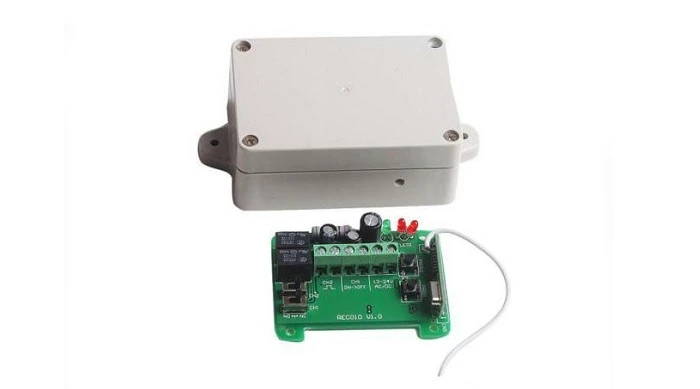
And the Controller for Tubular Motor is essential for controlling tubular motors in various applications, such as automatic door systems and window blinds.
Why Choose Our Wired Transmitters
As a leading supplier of wired transmitters, we offer a range of high - quality products. Our transmitters are designed with the latest technology to ensure reliable and efficient data transmission. We use premium materials in the manufacturing process, which results in durable and long - lasting devices.
Our customer support team is always ready to assist you with any questions or issues you may encounter during the installation and operation of our wired transmitters. We also provide comprehensive technical documentation and resources to make your experience as smooth as possible.
Ready to Purchase?
If you're interested in our wired transmitters or any of the related products mentioned above, we encourage you to reach out to us for a quote and further discussion. We are committed to meeting your specific requirements and providing you with the best solutions for your applications. Whether you are working on a small - scale project or a large - scale industrial automation system, we have the products and expertise to support you.
References
- "Industrial Automation Handbook" - A comprehensive guide to industrial automation technologies and devices.
- Manufacturer's documentation for wired transmitters and related products.